Security centre
Table of contents
Keep your browser up to date
We take your security very seriously. In order to protect you and our systems, we are making changes to all HSBC websites over the coming weeks that mean some of the oldest web browser versions will no longer be able to access these sites. Generally, the latest versions of a browser (like Internet Explorer, Google Chrome, Apple Safari, etc.) and an operating system family (like Microsoft Windows, MacOS) have the most up-to-date security features.
If you are not using recent browser versions, please upgrade your browser to the latest version via their websites or search online for advice on how to do this.
To find out more about how to protect yourself online, please visit our online security pages.
HSBC Safeguard
In today's increasingly connected world, it's more important than ever to ensure your security - especially when it comes to banking. That's why we're introducing HSBC Safeguard: a series of initiatives designed to provide better protection for all of our customers from fraud and financial crime across our global processes and systems.
Information is key to protection
Our systems and processes rely on us having the most up-to-date information about all of our customers. Soon you will be asked to do one or all of the following:
- confirm or update your existing personal or business details
- provide some new information which may include submission of original documents
We understand that this may cause some inconvenience, and we apologise in advance for this, but we will work with you to ensure the process is as simple and straightforward as possible.
HSBC Safeguard FAQs
HSBC Digital Secure Key: Smarter security for your money
Introducing the new HSBC Secure Key
In today’s digital world, keeping your finances safe is more important than ever. At HSBC, we’re committed to providing cutting-edge security solutions, like the HSBC Digital Secure Key, to ensure only you can access your accounts, anytime, anywhere.
- Enhanced protection against online fraud
The Digital Secure Key offers multi-factor authentication (MFA), adding an extra layer of security to your online banking. Instead of relying on a physical device, this digital version generates a unique, one-time passcode directly from your smartphone. To log on or authorise sensitive transactions, such as transferring money, you’ll need both your password and this dynamic code. - Peace of mind, wherever you are
No more worrying about losing a physical device. Your Digital Secure Key is always with you, securely stored in the HSBC Philippines app. Every transaction is verified in real-time, ensuring only you can authorise payments or changes to your account. - Convenient and always accessible
• No extra hardware needed: Works seamlessly on your smartphone.
• Instant activation: No waiting for delivery; set it up directly in the app.
• Always with you: As long as you have your phone, you have your Secure Key.
- Simple and secure
Using the Digital Secure Key is effortless:
1.Open the HSBC Philippines app and tap 'Generate security code'.
2.Select the kind of code you’d like to generate and enter your Secure Key PIN or use biometric authentication (fingerprint or face recognition).
3.Get a one-time passcode to complete your log on, verify a transaction, or re-authentication code.
- How to get started
The HSBC Digital Secure Key is free when you register for mobile banking. Simply download the HSBC Philippines app, follow the instructions for setup, and enjoy enhanced security in seconds.
With cyber threats evolving, protecting your money shouldn’t be complicated. The Digital Secure Key combines advanced security with hassle-free convenience, so you can bank with confidence.
3D Secure Service for Online Purchases
Get peace of mind when you shop online with your HSBC Credit or Debit Card. With HSBC's 3D Secure, you'll get an extra level of protection for your online purchases. This provides you:
- Enhanced layer of security for your online purchases, powered by Verified by Visa and Mastercard Identity Check
- Honored at major merchant websites that support 3D Secure
- Available at no cost
- No registration required
- Easy to use on any device, with no additional software required
3D Secure replaces HSBC Secure Pay, where cardholders were required to enter a Secure Pay password or answer additional security questions (Card Expiry Date, Date of Birth, and CVV2).
How does 3D Secure work?
When you make an online purchase, you will be asked to enter the following information on the merchant payment page. Check that all of the details are entered correctly:
- Card number
- Expiry date
- Name as shown on card
- CVV2 (the 3-digit number printed on the signature panel at the back of the card)
Once submitted, you may be asked to enter a One-Time Password (OTP) if we need to check that your purchase is genuine:
- You will be directed to the HSBC and Visa/Mastercard authentication screen requesting for an OTP. It will contain your transaction details: merchant name, transaction amount, and last 4 digits of your card number. Please check that all of the details are correct
- We'll notify you on your registered HSBC Philippines app, email address or mobile number. The notification will contain the 6-digit OTP
- Enter the OTP on the authentication screen and select 'Confirm' to complete the transaction. The OTP expires in 5 minutes
- Once your transaction is approved, you will be redirected to the merchant screen confirming your payment
Safety tip: Never share your OTP with anyone.
Help keep yourself safe online
Please make sure you keep your mobile number with us up to date. You may update your mobile number by:
- Logging on to HSBC online banking with your Secure Key. Once logged on, click on your name on the upper right-hand corner of the screen, then select "Edit personal & contact details" (for bank account holders only)
- Calling us at:
- HSBC Credit Card customers: (02)8858-0000 from Metro Manila, +1-800-1-888-8555 domestic toll-free for calls outside Metro Manila through PLDT landlines, or (02)7976-8000 / +800-100-85-800 from overseas
- HSBC Premier customers: (02)8858-0800 from Metro Manila, +1-800-1-888-4722 domestic toll-free for calls outside Metro Manila through PLDT landlines, or (02)7976-8080 / +800-100-85-808 from overseas
- HSBC Advance / Personal Banking customers: (02)8858-0000 from Metro Manila, +1-800-1-888-8000 domestic toll-free for calls outside Metro Manila through PLDT landlines, or (02)7976-8000 / +800-100-85-800 from overseas
- Visiting the nearest HSBC branch (for bank account holders only)
More Information
Log on to online banking
HSBC Mobile Banking app
Download the HSBC Mobile Banking app


Zoom mobile app
Download the Zoom mobile app
Protected transactions
With the new HSBC Secure Key, more transactions are now protected to help keep your money safe.
- Adding a New Payee (Person)
- Transfers to a New Payee (other HSBC account, other HSBC credit card or other local/international bank)
- Sending a Secure Message
- Global View linking
- Glober Transfers between linked accounts
- Opening new accounts - savings or term deposit
- Ordering a chequebook
- Requesting a PIN
HSBC Secure Key help & troubleshooting
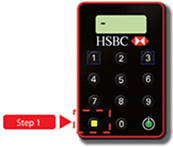
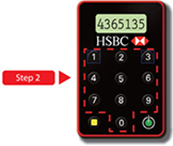
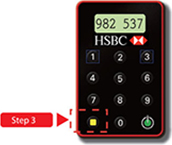
Generate a transaction security code
How to order an HSBC Secure Key for the first time
The HSBC Secure Key is free for HSBC bank account holders. For other customers, a PHP500 fee will apply.
- Log on to online banking
- Select your name from the menu at the top of the online banking dashboard and choose 'Manage Secure Key'
How to order a replacement Secure Key
Replacing your defective Secure Key is free. Replacing a lost, stolen or damaged Secure Key will incur a charge of PHP500.
HSBC Premier customers
(02)8858-0800 from Metro Manila
(02)7976-8080 from overseas
1-800-1-888-4722 domestic toll-free for PLDT
HSBC Advance customers
(02)8858-0000 from Metro Manila
(02)7976-8000 from overseas
1-800-1-888-0000 domestic toll-free for PLDT
HSBC credit card customers
(02)8858-0000 from Metro Manila
(02)7976-8000 from overseas
1-800-1-888-555 domestic toll-free for PLDT
For inquiries or complaints, please call HSBC's Customer Service at (02) 8858-0000 or (02)7976-8000 from Metro Manila, +1-800-1-888-8555 PLDT domestic toll-free, (International Access Code) + 800-100-85-800 international toll-free for selected countries/regions, or talk to us through Chat by clicking on the icon at the bottom right of our homepage. If you want to find out more about HSBC's customer feedback procedures, please visit hsbc.com.ph/feedback.
The Hongkong and Shanghai Banking Corporation Limited is regulated by the Bangko Sentral ng Pilipinas https://www.bsp.gov.ph.
Deposits are insured by PDIC up to PHP1,000,000 per depositor.
Note: Do not provide your account or credit card numbers or disclose any other confidential information or banking instructions through chat.